

Differential taxation is important in the trade of used, movable tangible goods. It aims to prevent VAT from being charged in full on the entire refurbished item upon resale. VAT is only calculated and paid on the difference between the purchase price and the selling price.
The application of differential taxation requires that,
- that a resale is taking place,
- that the item was acquired within the Community territory and
- that no sales tax or differential tax was incurred when purchasing the items
The SAP Business One standard does not take differential taxation into account.
We have developed a solution: A program extension allows accounting entries to be generated automatically in the system background. This enables you to handle your differential taxation easily, automatically, and with correct accounting practices.

In detail, this means:
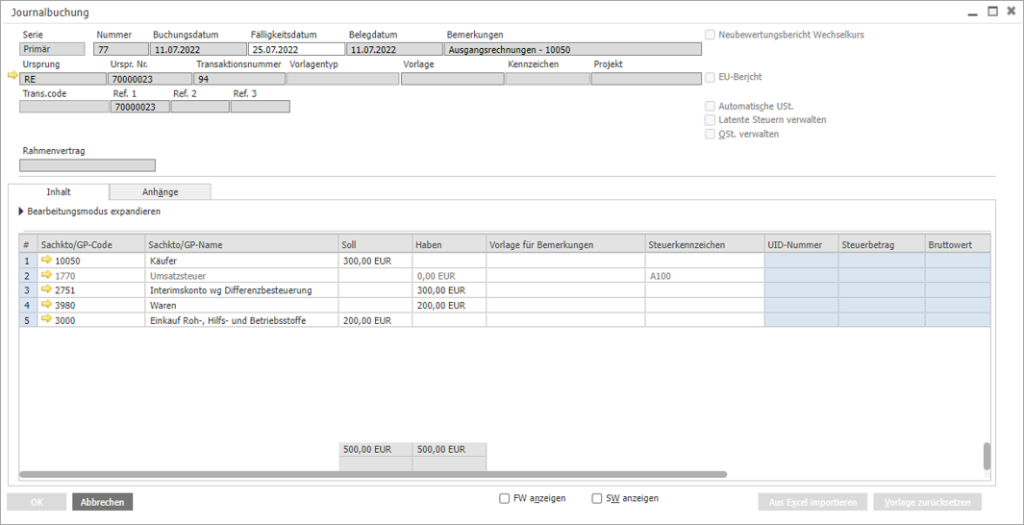
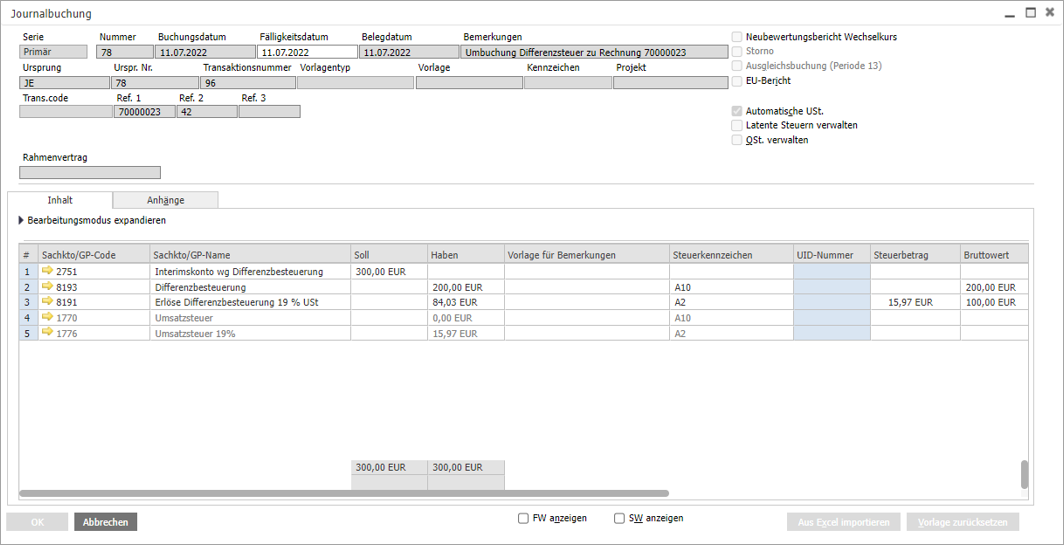
As soon as an outgoing invoice is created in SAP Business One Cloud with an item subject to differential taxation, two journal entries are automatically made:
- The first journal entry posts the revenue from the invoice to an interim revenue account.
- A second journal entry posts the untaxed revenue to accounts 8193 (SKR 03) or 4240 (SKR 04) and the taxed revenue to accounts 8191 (SKR 03) and 4220 (SKR 04). At the same time, the tax on the difference between the purchase price and the selling price is calculated and the interim revenue account is corrected.
The journal entries generated in SAP Business One Cloud can be seen in the screenshots below:
The training material for the configuration and application of differential taxation